
Skip to content

Routes

The GPS route of every trip on the map

When you need to check a job, account for some mileage or look into a refuel, the journey history has it all. It is route tracking for your fleet, trip by trip.

  • Trip history for each vehicle.
  • Stops and refuelling at the exact point on the route.
  • A downloadable report with all the route details.
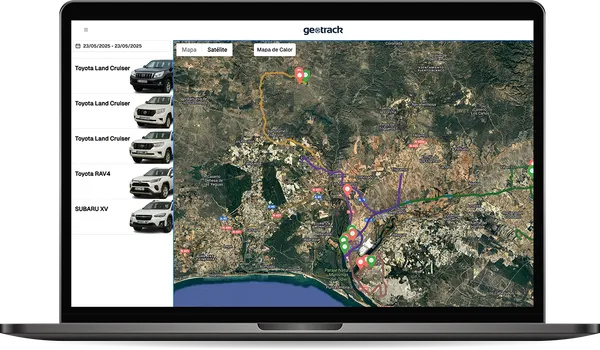
Geotrackr route history on the satellite map with the list of vehicles

Refuelling

Every refuel at its point on the route

Every refuel appears at the point on the route where it happened, with its amount. That way the kilometres add up with the fuel, and the cost goes into the vehicle's expenses.

It works just as well for delivery vans as for lorries or company cars.

Frequently asked questions

What people ask us most

Can't find your answer? Call us and someone from the team will help you.

Phone+34 959 54 07 12
Can I download the routes?

Yes. You can view each vehicle's trip history and download a report with all the route details.

Can I see the stops?

Yes. The journey history shows the stops and the refuelling at their exact spot.

Where can I access it?

From the Android and iOS app and from the web dashboard on any computer. The data is the same in both.

Can I try Geotrackr before signing up?

Yes. There is an open demo with sample data where you can see the map, the routes, the expenses and the documents. We can also show it to you with your own vehicles.

Geotrackr

Other features

Geotrackr

Try it with your vehicles

Open the demo with sample data or ask us to show it to you with your own fleet.