Skip to content

Truck fleet management

Your whole lorry fleet on one screen

With lorries out on the road, knowing where each one is without phoning the driver saves everyone time. Geotrackr shows you the position of each lorry in real time and, in its dashboard, a summary of the fleet: kilometres, fuel consumption and spend.

  • The position of each lorry in real time.
  • A dashboard with the kilometres, fuel consumption and spend of each one.
  • App for Android and iPhone and web dashboard.
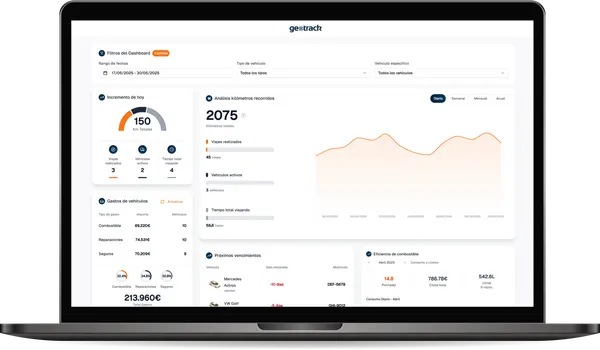
Geotrackr dashboard with the fleet summary: mileage, spend and fuel consumption chart

Routes

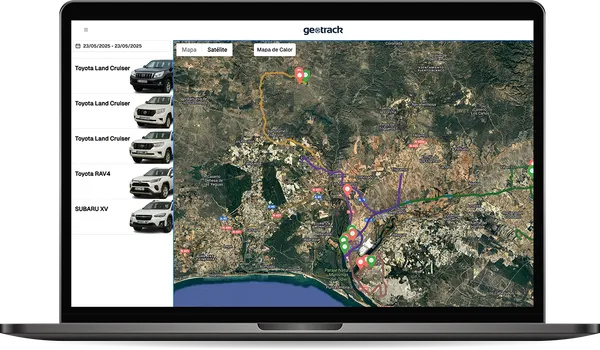
Each lorry's routes with stops and speeds

The journey history keeps the full route of each lorry: the places it has been, its stops and its speeds. Use it to review a trip, check a job and plan your next commercial routes with real data.

  • Full routes and trip history.
  • Stops and speeds on every route.
  • A report for each route to download.
Geotrackr route history on the satellite map with the list of vehicles

Costs

The cost per kilometre of each lorry

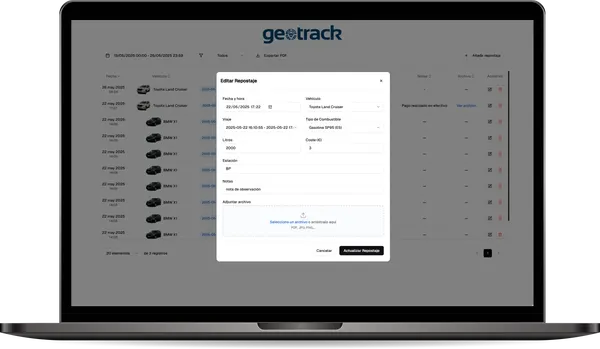
On a lorry, diesel, tyres and the workshop show up on every trip. Allocate each lorry's refuelling, repairs and any invoice to it, and Geotrackr gives you its annual spend and its cost per kilometre to compare it with the rest of the fleet.

  • Refuelling at its point on the route, with the amount.
  • Repairs and any invoice for the lorry.
  • Annual spend, cost per kilometre and fleet comparison.
Geotrackr form for adding a refuel to a vehicle

Documents

MOT, insurance and cards for each lorry

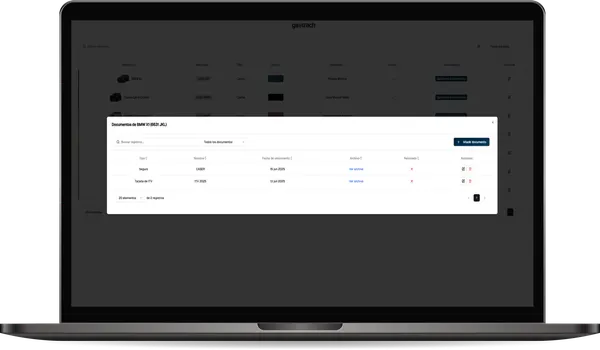
Expired documents bring fines and nasty surprises. Geotrackr stores each lorry's documents with their expiry dates and reminds you before they expire.

  • Insurance, MOT, cards and any other document.
  • The expiry date of each one.
  • A reminder before each one expires.
A vehicle's documents in Geotrackr with their expiry dates

Frequently asked questions

What people ask us most

Can't find your answer? Call us and someone from the team will help you.

Phone+34 959 54 07 12
Does Geotrackr work for lorries?

Yes. Geotrackr works for lorries and for any other vehicle: you see where each one is, its routes with stops and speeds, its refuelling, its expenses and its documents.

How is each vehicle located?

Each vehicle has a GPS tracker fitted. The app and the web dashboard are where you check where it is and everything else.

Can I see what each lorry costs me?

Yes. You allocate each lorry's refuelling, repairs and invoices to it, and you see its annual spend and its cost per kilometre.

Where can I access it?

From the Android and iOS app and from the web dashboard on any computer. The data is the same in both.

Can I try Geotrackr before signing up?

Yes. There is an open demo with sample data where you can see the map, the routes, the expenses and the documents. We can also show it to you with your own vehicles.

Geotrackr

More from Geotrackr

  • Real-time tracking

    Where each vehicle is right now, on the map, on your phone or on your computer.

  • Journey history

    Where each vehicle has been, with its stops and refuelling, and a downloadable report.

  • Running costs and cost per kilometre

    Refuelling, repairs and invoices for each vehicle, with its annual spend and its cost per kilometre.

  • Documents and reminders

    Insurance, MOT, cards and any other fleet document, with a reminder before it expires.

  • Delivery vans

    Where each delivery van is, where it has been, its stops and what it costs.

  • Company cars

    Where each company car is, its journeys, its spend and what you need to tell your staff.

Geotrackr

Try it with your lorries

Open the demo with sample data or ask us to show it to you with your own lorry fleet.